Fix Inconsistent NAP Listings: A Local SEO Guide
Wondering how do I fix inconsistent NAP listings? Follow this friendly step-by-step guide to boost your local SEO rankings fast.

Key Takeaways
-
Inconsistent NAP listings directly hurt your local search rankings and customer acquisition because Google treats mismatched business information as a trust signal weakness, causing you to lose visibility in local searches.
-
Create one official NAP format and update Google Business Profile first, as it carries the most weight for local search—then systematically update your website, major directories like Yelp and Apple Maps, and monitor quarterly.
-
Small inconsistencies like 'St.' vs 'Street', different phone number formatting, or leaving off suite numbers multiply across directories and confuse both search engines and customers trying to contact you.
-
Search for duplicate listings using your business name with old addresses, as duplicates split reviews and citations across multiple profiles, making your business appear less popular and trustworthy than it actually is.
-
Set calendar reminders to recheck listings every few months and assign one team member to manage your Google Business Profile, since NAP cleanup is ongoing maintenance, not a one-time fix.
-
Consider professional help if you've found 10+ inconsistent listings, have multiple locations, recently rebranded, or keep seeing old information reappear despite your fixes.
Picture this: a customer in Brandon searches for your business, but Google shows an old phone number. They call it, get nothing, and move on to your competitor. Frustrating, right? This happens more than you’d think, and it’s called an inconsistent NAP listing. NAP stands for Name, Address, and Phone number, and when these details don’t match across the internet, it confuses both customers and search engines.
Here at Brain Buzz Marketing, we’ve helped small businesses across Tampa Bay clean up messy listings and win back lost customers. Fixing inconsistent NAP listings isn’t just busywork. It’s one of the most important steps in local SEO services, and it directly affects whether people can find and trust your business online.
In this guide, we’ll walk you through exactly how to spot these errors, fix them, and keep them from coming back. Grab a coffee, and let’s get your business information squared away for good.
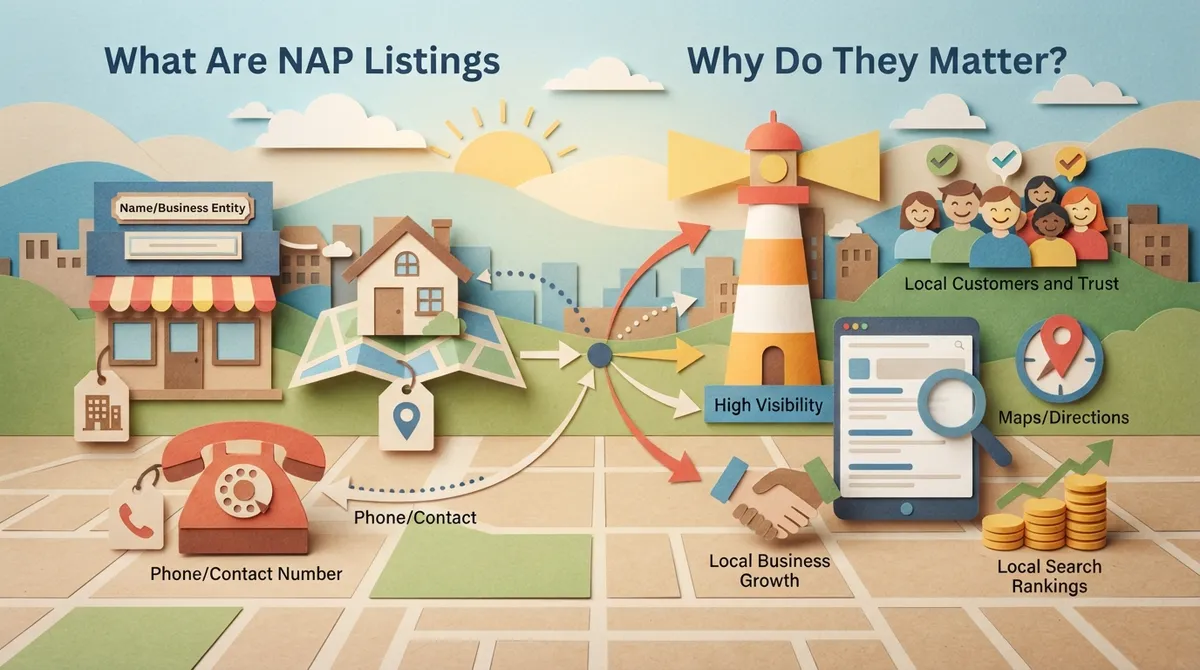
What Are NAP Listings and Why Do They Matter?
NAP simply means your business Name, Address, and Phone number. These three details appear everywhere online: your website, Google Business Profile, Yelp, Facebook, and dozens of other directories.
Search engines like Google use NAP information to verify your business is real and trustworthy. When your NAP matches everywhere, Google feels confident showing your business in local search results. When it doesn’t match, Google gets confused about which information is correct. This confusion can hurt your rankings.
Think of it like mail delivery. If your address is spelled differently on different envelopes, the mailman might deliver to the wrong house or not deliver at all. Search engines work the same way with your business data.
Common NAP Inconsistencies We See
Small differences might seem harmless, but they add up fast. Here are the most common mistakes we find during audits:
- Using “St.” on one site and “Street” on another
- Listing a suite number on your website but leaving it off Google
- Old phone numbers still active on outdated directories
- Business name variations like “Brain Buzz Marketing LLC” versus just “Brain Buzz Marketing”
- Different formatting for phone numbers, such as (813) 555-1234 versus 813-555-1234
Even one of these small mismatches can create confusion. Multiply that across ten or twenty directories, and you’ve got a real problem hurting your local rankings.

Why Inconsistent Listings Hurt Your Business
Bad NAP data doesn’t just annoy customers. It creates real business problems that cost you money every single day.
- Lower local search rankings. Google rewards businesses with consistent, verified information. Inconsistent data signals that your business might not be legitimate or active.
- Lost customers. If someone calls a disconnected number or drives to the wrong address, they won’t try calling back. They’ll just choose a competitor instead.
- Reduced trust signals. Search engines use trust signals to rank businesses. Mismatched data weakens those signals across the board.
- Wasted ad spend. If you’re running Google Ads and your landing page shows different contact info than your ad, you could see lower conversion rates and wasted budget.
- Confused reviews and citations. Reviews sometimes get split between duplicate listings, making your business look less popular than it actually is.
According to the Federal Trade Commission’s guidance on online business marketing, accuracy in advertising and business representation isn’t just good practice. It builds consumer trust and keeps you compliant with fair marketing standards.

How Do I Fix Inconsistent Name Address Phone Listings?
Good news: fixing this problem is very doable, even if it feels overwhelming at first. Follow these steps in order, and you’ll have clean, consistent listings in no time.
Step 1: Decide on Your Official NAP Format
Before you fix anything, pick one exact format for your business name, address, and phone number. Write it down. This becomes your master record.
For example, decide if you’re “Brain Buzz Marketing” or “Brain Buzz Marketing LLC” everywhere. Decide if your address uses “Suite 200” or “Ste. 200.” Consistency matters more than which style you pick.
Step 2: Audit Your Current Listings
Search your business name on Google and see what comes up. Check these key places:
- Google Business Profile
- Your own website footer and contact page
- Facebook, Instagram, and other social profiles
- Yelp, Bing Places, and Apple Maps
- Industry-specific directories
- Old press releases or guest blog posts
Write down every version of your NAP you find. This helps you see patterns and catch the sneaky ones hiding on page three of search results.
Step 3: Update Your Google Business Profile First
Your Google Business Profile carries the most weight for local search. Log in and update your name, address, and phone number to match your official format exactly.
This is also a great time to check your business hours, categories, and photos. A complete, accurate profile helps you show up in the local map pack more often. If you want to see how a well-managed profile looks, visit us on Google — Brain Buzz Marketing to check out our own listing.
Step 4: Fix Your Website Information
Your website should match your Google listing exactly. Update your footer, contact page, and any schema markup. If you’re not sure how schema markup works, our team can help through our SEO services, which include technical fixes like this one.
Step 5: Update Major Directories and Citations
Work through the big directories one by one. This includes Yelp, Bing Places, Apple Maps, Facebook, and any industry-specific sites relevant to your business. Some directories let you claim your listing for free, while others require account verification.
Step 6: Track Down and Fix Duplicate Listings
Duplicate listings are sneaky troublemakers. They often happen when a business moves, changes its name, or gets listed twice by accident. Search your business name along with your old address to find these ghosts.
Once found, you can usually request removal or merge duplicates directly through the platform. Google Business Profile has a built-in process for reporting duplicates.
Step 7: Monitor and Maintain Consistency
NAP cleanup isn’t a one-time task. New directories pop up, old ones get outdated, and mistakes happen. Set a calendar reminder every few months to recheck your listings.
| Directory Type | Update Frequency | Priority Level |
|---|---|---|
| Google Business Profile | Monthly check | Highest |
| Website & Schema Markup | Whenever info changes | Highest |
| Major Directories (Yelp, Bing, Apple Maps) | Quarterly check | High |
| Social Media Profiles | Quarterly check | Medium |
| Industry-Specific Sites | Twice yearly | Medium |

Tools That Make NAP Cleanup Easier
You don’t have to do this all by hand. Several tools can speed up the process and help you spot problems faster.
- Google Search: Simply searching your business name reveals a lot about where your info appears.
- Citation tracking software: These tools scan the web for your business mentions and flag mismatches automatically.
- Google Business Profile dashboard: Use the built-in insights to see how customers are finding you and what information they see.
- Professional audits: Sometimes it’s faster and more accurate to have an expert team handle the heavy lifting.
If digging through dozens of directories sounds exhausting, you’re not alone. Many small business owners find this task eats up hours they simply don’t have. That’s exactly why our digital marketing services include NAP audits as part of a bigger local SEO strategy.
NAP Consistency and Your Website Design
Sometimes the root cause of NAP problems traces back to your website itself. If your site uses an outdated website design or has multiple contact pages with different information, it can confuse both visitors and search engines.
A clean, well-structured website should have your NAP information clearly displayed in the footer on every page. This consistency signals trust to Google and makes it easy for customers to reach you no matter which page they land on.
We’ve also seen businesses run into trouble when they switch WordPress Hosting providers or redesign their site without carrying over accurate contact details. It’s a small detail that gets overlooked during bigger projects, but it matters a lot for local search performance.
How NAP Fits Into a Bigger Local SEO Strategy
Fixing your NAP listings is just one piece of the local SEO puzzle. It works best alongside other strategies like building citations, gathering reviews, and creating location-specific content.
For businesses in Brandon, Riverview, Valrico, or anywhere in the greater Tampa Bay area, local SEO is especially important because customers are searching for services “near me” every single day. If your listings are wrong, you’re invisible to those searches, no matter how great your business actually is.
We recommend pairing your NAP cleanup with a review of your overall local SEO strategy to make sure everything works together. Consistent NAP data combined with strong reviews and quality content gives you the best shot at ranking well in local search results.
Signs You Need Professional Help
Sometimes DIY fixes aren’t enough. Here’s when it makes sense to bring in outside help:
- You’ve found more than 10 inconsistent listings and don’t know where to start
- Your business has moved locations multiple times over the years
- You’ve rebranded or changed your business name recently
- You manage multiple business locations with different NAP details for each
- You’ve tried fixing listings before but keep seeing the old information reappear
If any of these sound familiar, it might be time to let a team of experts handle the details while you focus on running your business. You can follow our team’s updates and tips on Instagram for more quick digital marketing advice.
Keeping Your Listings Accurate Long-Term
Once your NAP listings are clean, protecting that consistency becomes the goal. Here are simple habits to build into your routine:
- Update every directory at the same time whenever your info changes
- Assign one team member to manage your Google Business Profile
- Check your listings quarterly, even if nothing has changed
- Document your official NAP format somewhere easy to reference
- Set alerts for new mentions of your business name online
Small habits like these prevent the headache of a full cleanup down the road. It’s much easier to maintain accuracy than to fix a huge mess later.
Final Thoughts on Fixing NAP Inconsistencies
Fixing inconsistent name, address, and phone listings takes patience, but it pays off. Customers find you easier, search engines trust you more, and your local rankings improve over time. This is one of those behind-the-scenes tasks that doesn’t feel exciting but makes a real difference in how many calls and visits your business gets.
Our founders, Eric and Nicole, built Brain Buzz Marketing on the idea that even the smallest details matter when it comes to online visibility. You can learn more about their approach by connecting with Eric on LinkedIn or Nicole on LinkedIn. Their decades of combined experience mean your business gets thoughtful, hands-on attention rather than a cookie-cutter approach.
If you’d rather skip the spreadsheet headaches and let professionals handle your local SEO cleanup, we’re here to help. Our team also works with tools like SEO Rocket, which produces fully automated blog posts that rank, to keep your content strategy strong while we handle the technical side of local search.
Ready to get your business information accurate everywhere it counts? Reach out to our team today and let’s clean up your listings together.
FAQs
Q: What does NAP mean in local SEO?
A: NAP stands for Name, Address, and Phone number. It refers to your business’s core contact details that appear across the web. Keeping these consistent everywhere helps search engines trust and rank your business higher in local results.
Q: How long does it take to fix inconsistent NAP listings?
A: It really depends on how many directories your business appears on. A small business might clean things up in a few hours, while a business with years of history could take several weeks. The good news is once it’s done, maintaining it is much quicker.
Q: Can inconsistent NAP listings hurt my Google ranking?
A: Yes, absolutely. Google uses NAP consistency as a trust signal for local search results. When your information doesn’t match across the web, it can lower your visibility in local searches and the map pack.
Q: Do I need to fix every single directory listing?
A: Focus on the big ones first, like Google Business Profile, your website, and major directories like Yelp and Bing Places. Smaller or outdated directories matter less, but it’s still worth cleaning them up when you have time.
Q: Should I hire someone to fix my NAP listings for me?
A: If you’re short on time or have a lot of duplicate listings, professional help can save you a huge headache. Our team at Brain Buzz Marketing handles this as part of our local SEO services, so you can focus on running your business instead.
Our Service Area